
Godot
Reference for Godot: how the addon translates your shaders, what is supported and the names of the vertex data.
Godot has its own shader language, the Godot Shading Language, saved in .gdshader files. You write the shader in C# and Yotsuba Shader translates it to that language for you.
1. The addon: translate every time you press Play#
Running the command by hand every time you change the shader gets old. Yotsuba Shader has an addon for the Godot editor that does it for you.
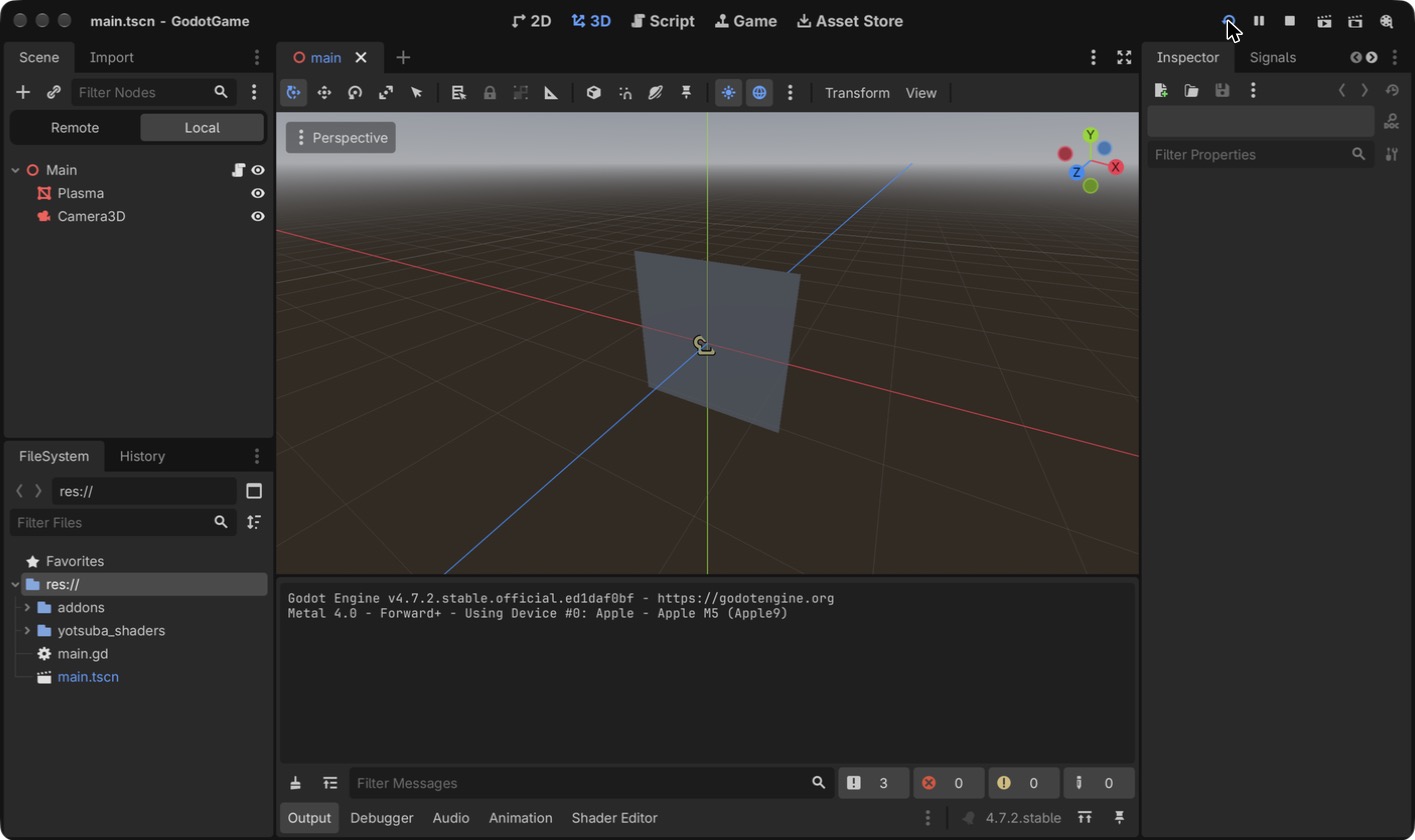
First, copy that folder, yotsubashader, into GodotGame/addons/ (create addons if it does not exist). When you open the project in Godot, the folder shows up in the file panel, as in the screenshot above.
Second, in Godot: Project → Project Settings → Plugins. YotsubaShader appears in the list, turned off.
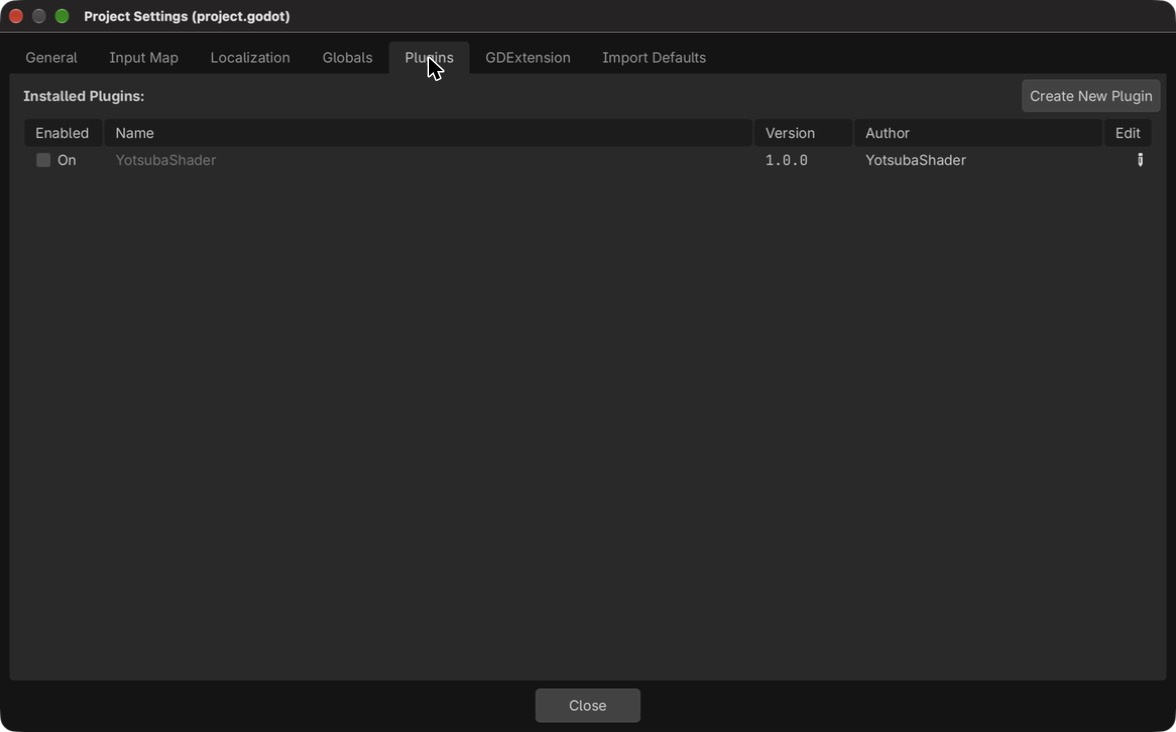
Tick the box to turn it on.
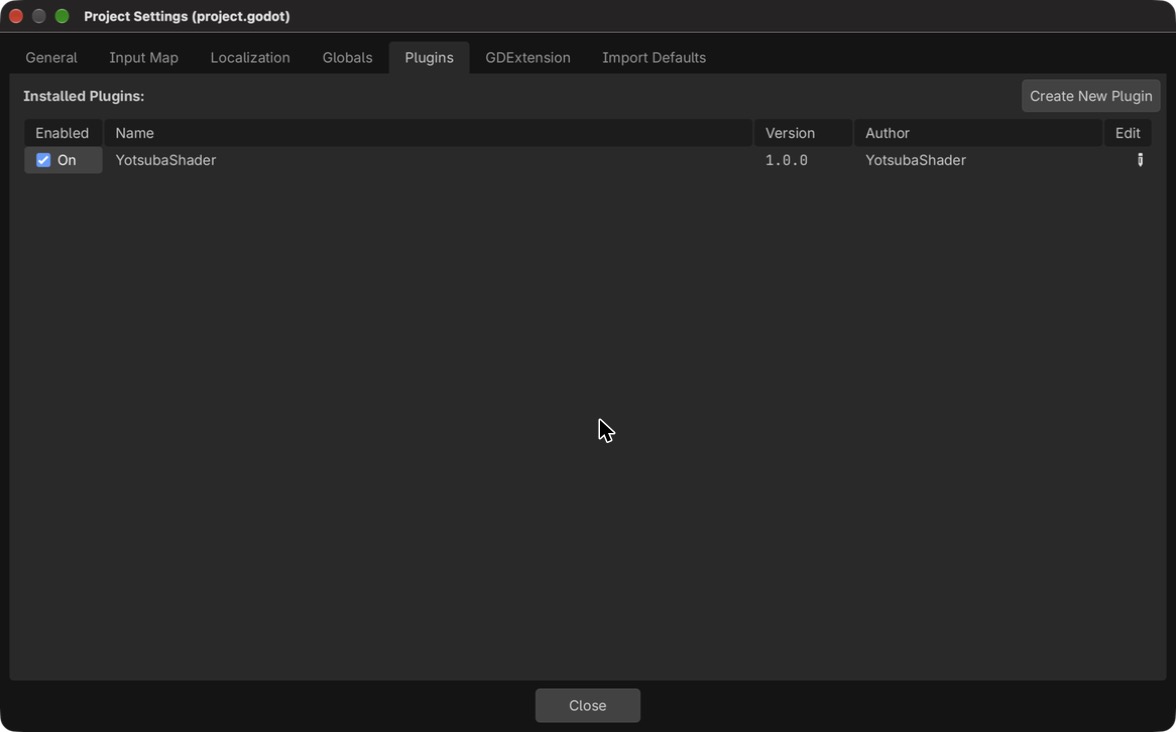
Third, in the General tab, turn on Advanced Settings (the switch at the top right). A section called Yotsuba Shader appears: if you do not see it, type yotsuba in the filter. The project field is empty.
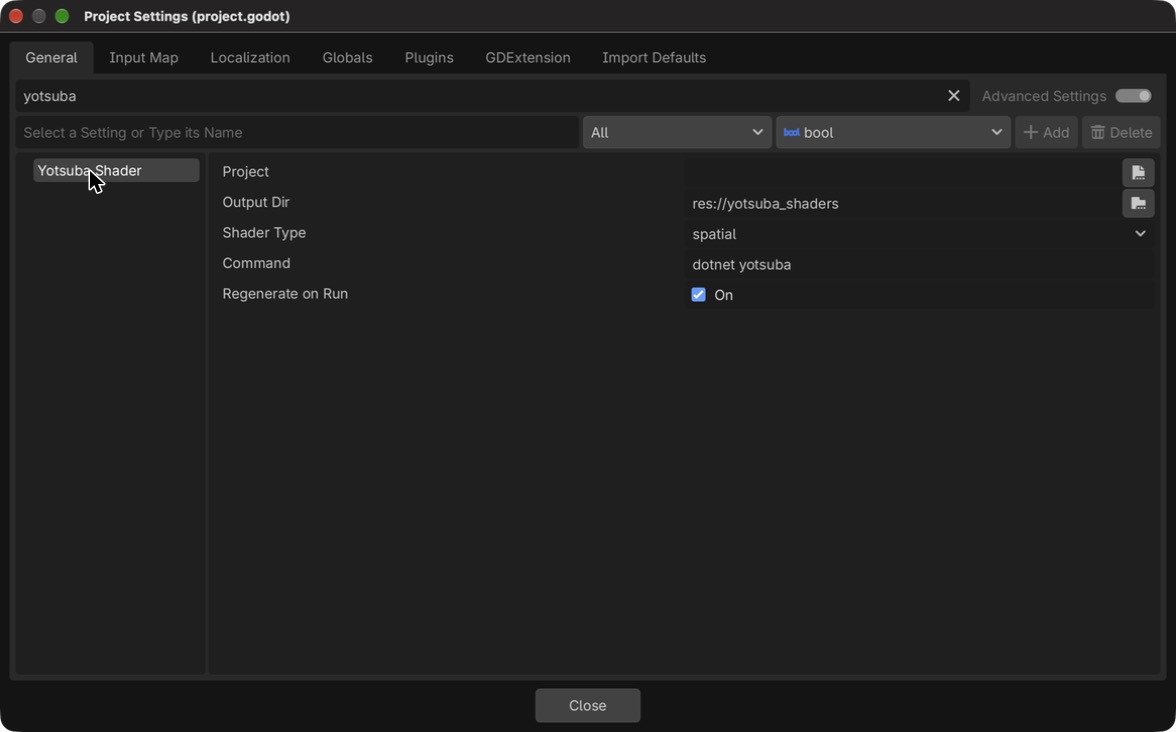
Set project to ../MyShaders/MyShaders.csproj (the path is relative to the Godot project).
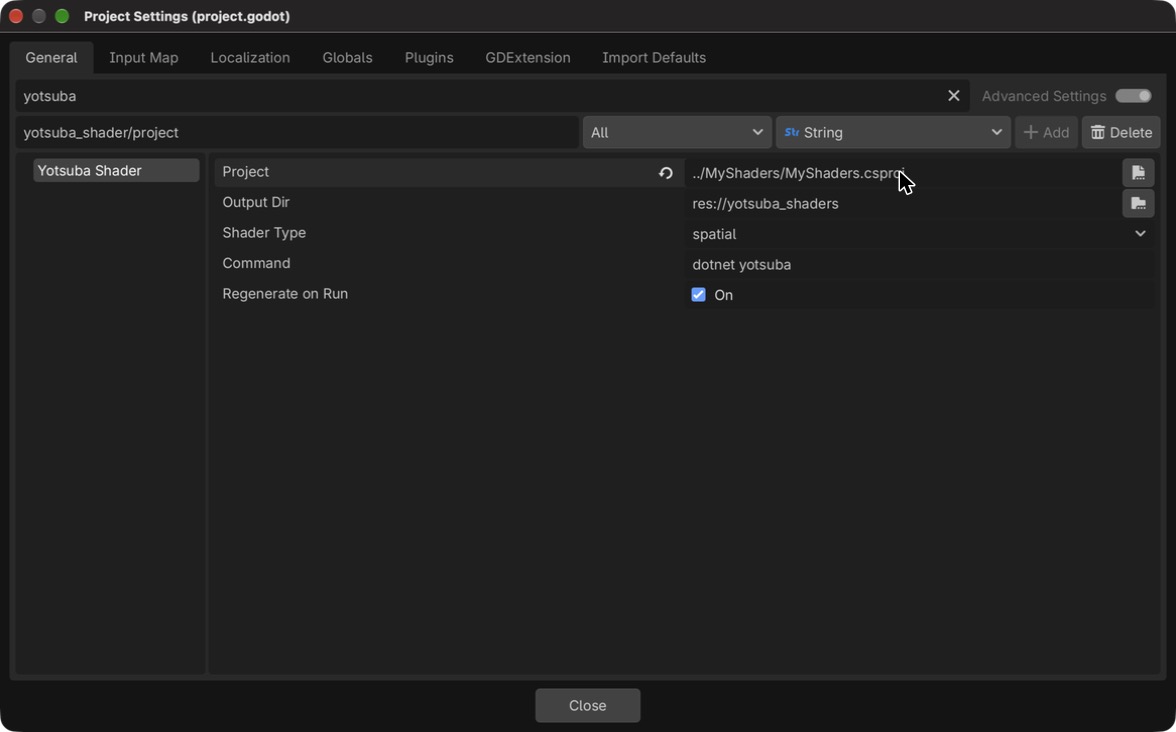
These are all the settings:
| Setting | What it is | Default |
|---|---|---|
project | Path to the .csproj with your shaders (absolute, or relative to the Godot project) | empty |
output_dir | Where the .gdshader files are written | res://yotsuba_shaders |
shader_type | spatial, canvas_item or both | spatial |
command | The yotsuba command | dotnet yotsuba |
regenerate_on_run | Regenerate when you press Play | on |
From now on the addon runs the same compile --target godot command that you typed, and writes the files in output_dir. It does it:
- every time you press Play, before the game starts, and
- from the menu Project → Tools → Regenerate YotsubaShader shaders.
Then Godot refreshes its file system. If the command fails, the error shows up in Godot's output panel. A failure in a shader type you did not choose (for example canvas_item, when you only use spatial) is not counted as an error.
Press Play (the triangle at the top right). Before the game starts, the addon translates the shader, and then the game window opens.
Two things that can go wrong:
2. What gets translated#
The vertex method of your shader is the part Godot cares about most. Take Vertex:
    [ShaderStage(Stage.Vertex)]
    public Pixel Vertex(GodotVertex corner)
    {
        Pixel pixel;
        pixel.Position = Make.Vec4(corner.VERTEX.X, corner.VERTEX.Y, 0f, 1f);
        pixel.Uv = corner.UV;
        return pixel;
    }
In the .spatial.gdshader it becomes this:
void vertex() {
    vec2 corner_VERTEX = VERTEX.xy;
    vec2 corner_UV = UV;
    vec4 ys_position = vec4(0.0);
    Pixel pixel;
    pixel.Position = Vec4(corner_VERTEX.x, corner_VERTEX.y, 0.0, 1.0);
    pixel.Uv = corner_UV;
    ys_position = pixel.Position;
    v_Uv = pixel.Uv;
    POSITION = ys_position;
}
Look at the correspondences:
- The method
Vertexbecamevoid vertex(), and the fragment methodFragmentbecamevoid fragment(). - The
VERTEXfield of yourGodotVertexreads Godot'sVERTEX, and theUVfield readsUV. Those are the names that Godot gives to the data of each vertex, and the plugin chose them by the name of your field. - What the vertex hands to the fragment (
pixel.Uv) became avarying,v_Uv, that the fragment reads. - The position you return (
gl_Position) is written inPOSITION. This is a position in clip space, the-1to1of before. That means Godot does not apply its own matrices (model, view and projection) to a shader made like this. If you want them, you have to send them as a uniform and multiply them yourself in the vertex method. This guide does not cover how. - The final color (
[return: location(0)]) goes toALBEDOandALPHA.
The names you can use in the input struct are in section 3. In canvas_item only the position, the color and UV exist.
More things the plugin does:
- A
[uniform]struct becomes oneuniformper field, with the name<Field>_<Member>, as you saw. - A texture becomes
uniform sampler2D <name>. How it is filtered or repeated is decided by Godot, with the options of the texture, and not by theSamplerStateof your C#. - The
spatialfiles are generated withrender_mode unshaded, cull_disabled;.unshadedbecause the fragment already calculates the final color, and Godot should not add light on top.cull_disabledbecause aShaderMaterialcannot turn off the culling (throwing away the faces that look backwards), and, as the position is in clip space, Godot was throwing away the faces: the rectangle of the whole screen was not visible without it.
Taking another shader from the tutorial#
Any shader of the Get Started goes to Godot with the same two changes you made to the plasma: in the vertex method, use GodotVertex instead of Corner, and read corner.VERTEX instead of corner.Position.
3. The names of the vertex data#
In the tutorial you declared GodotVertex with all the data that Godot delivers per vertex. This section explains each one.
The rule#
Vertex data is declared in a struct using these names, as in the tutorial:
public struct GodotVertex
{
    [location(0)] public vec3 VERTEX;
    [location(1)] public vec2 UV;
    [location(2)] public vec3 NORMAL;
    [location(3)] public vec4 COLOR;
}public struct GodotVertex
{
[POSITION] public vec3 VERTEX;
[TEXCOORD(0)] public vec2 UV;
[NORMAL] public vec3 NORMAL;
[COLOR] public vec4 COLOR;
}public struct GodotVertex
{
[attribute(0)] public vec3 VERTEX;
[attribute(1)] public vec2 UV;
[attribute(2)] public vec3 NORMAL;
[attribute(3)] public vec4 COLOR;
}public struct GodotVertex
{
[location(0)] public vec3 VERTEX;
[location(1)] public vec2 UV;
[location(2)] public vec3 NORMAL;
[location(3)] public vec4 COLOR;
}public struct GodotVertex
{
[Location(0)] public vec3 VERTEX;
[Location(1)] public vec2 UV;
[Location(2)] public vec3 NORMAL;
[Location(3)] public vec4 COLOR;
}- The name decides the meaning, and it is Godot's.
UVis the texture coordinate,NORMALis the normal. Thelocationnumber is still yours: it only has to be unique. - They are written exactly as in Godot: in capitals, with an underscore (
BONE_INDICES). That is the form the tutorial uses and the one in the tables below. - The language changes nothing. These names are not translated: the Spanish tutorial uses
UV, notTextura. - The name rules over the number and the semantic. If the field is called
UV, it isUV, whatever[location(1)],[attribute(1)]or[TEXCOORD(0)]it carries. - A name that is not on the list is never guessed. If it also carries no semantic the plugin knows (
[POSITION]...), the plugin gives an error that lists the names that exist, and never lets wrong data through silently.
The attributes#
This is the complete list of what Godot delivers per vertex in a spatial shader. The canvas_item ones are a subset, shown in each row.
| Name | Type in spatial | Type in canvas_item | In HlslSyntax |
|---|---|---|---|
VERTEX | vec3 | vec2 | POSITION |
NORMAL | vec3 | Does not exist | NORMAL |
TANGENT | vec3 | Does not exist | TANGENT |
BINORMAL | vec3 | Does not exist | BINORMAL |
UV | vec2 | vec2 | TEXCOORD(0) |
UV2 | vec2 | Does not exist | TEXCOORD(1) |
COLOR | vec4 | vec4 | COLOR |
CUSTOM0 | vec4 | vec4 | TEXCOORD(2) |
CUSTOM1 | vec4 | vec4 | TEXCOORD(3) |
CUSTOM2 | vec4 | Does not exist | TEXCOORD(4) |
CUSTOM3 | vec4 | Does not exist | TEXCOORD(5) |
BONE_INDICES | uvec4 | Does not exist | TEXCOORD(6) |
BONE_WEIGHTS | vec4 | Does not exist | TEXCOORD(7) |
POINT_SIZE | float | float | TEXCOORD(8) |
The types are Godot's. If you declare a different one of the same family, the plugin adapts it: a shorter one is padded (with 0, and with 1 in the w of VERTEX and COLOR), and a longer one is cut. That is why a vec2 VERTEX, like the full-screen rectangle in the tutorial, works.
One convention for each attribute#
VERTEX: the position#
[location(0)] public vec3 VERTEX;[POSITION] public vec3 VERTEX;[attribute(0)] public vec3 VERTEX;[location(0)] public vec3 VERTEX;[Location(0)] public vec3 VERTEX;The vertex position in object space. In canvas_item it is a vec2.
A warning: if you return this position as-is as the final position, it is a position in clip space, and Godot applies none of its matrices to it. That is what the plasma in this guide does.
NORMAL, TANGENT and BINORMAL#
[location(2)] public vec3 NORMAL;
[location(5)] public vec3 TANGENT;
[location(6)] public vec3 BINORMAL;[NORMAL] public vec3 NORMAL;
[TANGENT] public vec3 TANGENT;
[BINORMAL] public vec3 BINORMAL;[attribute(2)] public vec3 NORMAL;
[attribute(5)] public vec3 TANGENT;
[attribute(6)] public vec3 BINORMAL;[location(2)] public vec3 NORMAL;
[location(5)] public vec3 TANGENT;
[location(6)] public vec3 BINORMAL;[Location(2)] public vec3 NORMAL;
[Location(5)] public vec3 TANGENT;
[Location(6)] public vec3 BINORMAL;All three are vec3 and exist only in spatial: 2D has no normals. A shader that reads them cannot be canvas_item, and the compiler must say so with an error rather than produce a broken file.
UV and UV2#
[location(1)] public vec2 UV;
[location(4)] public vec2 UV2;[TEXCOORD(0)] public vec2 UV;
[TEXCOORD(1)] public vec2 UV2;[attribute(1)] public vec2 UV;
[attribute(4)] public vec2 UV2;[location(1)] public vec2 UV;
[location(4)] public vec2 UV2;[Location(1)] public vec2 UV;
[Location(4)] public vec2 UV2;UV goes from (0, 0) to (1, 1) over the surface. UV2 is the second coordinate, which Godot uses for things like lightmaps. In canvas_item only UV exists.
COLOR#
[location(3)] public vec4 COLOR;[COLOR] public vec4 COLOR;[attribute(3)] public vec4 COLOR;[location(3)] public vec4 COLOR;[Location(3)] public vec4 COLOR;In spatial it is the vertex color. In canvas_item, Godot multiplies it by the node's modulate and self_modulate, so the value you read is not the one stored in the mesh.
CUSTOM0 to CUSTOM3#
[location(7)] public vec4 CUSTOM0;[TEXCOORD(2)] public vec4 CUSTOM0;[attribute(7)] public vec4 CUSTOM0;[location(7)] public vec4 CUSTOM0;[Location(7)] public vec4 CUSTOM0;Four vec4 for your own data. They are the way out for data that fits none of the other names, and they have a cost: to fill them you must build the mesh by hand in Godot (with ArrayMesh), because the built-in meshes (QuadMesh, SphereMesh...) do not carry them.
In canvas_item only CUSTOM0 and CUSTOM1 exist. In HlslSyntax they travel as TEXCOORD(2) to TEXCOORD(5).
BONE_INDICES and BONE_WEIGHTS#
[location(11)] public uvec4 BONE_INDICES;
[location(12)] public vec4 BONE_WEIGHTS;[TEXCOORD(6)] public uvec4 BONE_INDICES;
[TEXCOORD(7)] public vec4 BONE_WEIGHTS;[attribute(11)] public uvec4 BONE_INDICES;
[attribute(12)] public vec4 BONE_WEIGHTS;[location(11)] public uvec4 BONE_INDICES;
[location(12)] public vec4 BONE_WEIGHTS;[Location(11)] public uvec4 BONE_INDICES;
[Location(12)] public vec4 BONE_WEIGHTS;A skeleton's data: which bones the vertex belongs to and how much each weighs. They exist only in spatial and are read-only. HlslSyntax has no semantic for bones or for the point size: that is why the HLSL variant uses an arbitrary [TEXCOORD(n)], and it is the name of the field that decides.
POINT_SIZE#
[location(13)] public float POINT_SIZE;[TEXCOORD(8)] public float POINT_SIZE;[attribute(13)] public float POINT_SIZE;[location(13)] public float POINT_SIZE;[Location(13)] public float POINT_SIZE;The size of a point when the mesh is drawn as points. In the tests, reading it inside vertex() made Godot draw nothing, so the plugin always delivers 1.0.
VERTEX_ID: not a field#
The vertex index does not come from the mesh: it is a built-in variable, like gl_VertexIndex in GLSL. It is not declared as a field named VERTEX_ID, but with the built-in variable of the syntax you use. Godot delivers it as VERTEX_ID in spatial and canvas_item.
How it is applied#
The priority the compiler follows to know what each piece of data is:
- The standard name from this page: always wins.
- The semantic the field carries (
[POSITION]...), if the name is not on the list. - An error that lists the names that exist. Never a silent guess.
And the rule has to hold for every engine. If it only failed on Godot, a shader would compile in MonoGame and not in Godot, and the promise is that what compiles works anywhere.
In the engines where you build the vertex yourself (MonoGame, KNI and FNA), the location number still rules, and the name only adds meaning to it. Your VertexDeclaration does not change.
What is pending#
- Publish the Godot plugin with the name recognition (today it only exists as an unpublished change).
- Translate
VERTEX_ID, which is a built-in variable and not a field. - Generate the
VertexDeclarationand the channel map automatically, so the programmer does not write them. - A strict portability rule: a shader with
[location(n)]and no standard name should fail to compile for any engine, not only for Godot.
What is not possible#
The plugin does not translate these, and it tells you with a clear error (it does not leave a broken file):
A shader that reads NORMAL cannot be a canvas_item (2D has no normals). In that case the CLI warns about that file and finishes with exit code 1, but the .spatial.gdshader is still written.
Summary#
What belongs to Godot, from everything you did:
| The plugin (for the CLI) | godot (--target godot) |
| What it produces | Text: a .gdshader, spatial or canvas_item |
| The command | dotnet yotsuba compile MyShaders/MyShaders.csproj --target godot --output ... |
| Its method in C# | ToGodotShader(GodotShaderType), which returns a string |
| The names of the uniforms | <Field>_<Member>, like Time_Seconds |
| The addon | addons/yotsubashader, which regenerates the files when you press Play |
What is the same as in the guides of MonoGame, KNI and FNA:
- The plugin is a tool of the
yotsubaCLI, and your game does not use it. - The first
--target godotdownloads the plugin by itself. - The data of a uniform is sent by name, with the rule
Field_Member.
What is different: for Godot you write the vertex data with Godot's names (VERTEX, UV), you get a text file instead of a binary, and Godot loads it with load(...) and a ShaderMaterial, not with new Effect(...).