
Repeating with loops
How to make a shader repeat a task, with for, break and continue, and how to store a list of data in an array.
You already know how to draw a circle. And six circles? And fifty? You are not going to copy and paste the same block fifty times. That is what loops are for: you tell the shader "repeat this so many times", and it does.
With loops, a shader does big things with little code. The Mandelbrot fractal, which you will make later, is nothing more than a loop that goes around a hundred times for each pixel.
Step 1: counting with a for#
Copy Template.cs as Loops.cs and change the class name to Loops. Replace the line in Fragment with this:
int steps = 0;
for (int i = 0; i < 5; i++)
{
    if (pixel.Uv.X > i * 0.2f)
    {
        steps++;
    }
}
float v = steps / 5f;
return Make.Vec4(v, v, v, 1f);
Run the work cycle:
Now run it. In Godot, select the Viewer node, write Loops in the Shader Name field of the Inspector and press Play (F5). The addon translates MyShaders first, and then the window opens.

Five stripes of gray, each one lighter. Let us see how it was done, starting with the for line:
for (int i = 0; i < 5; i++)It has three parts separated by ;:
| Part | What it does |
|---|---|
int i = 0 | Before starting, it creates a counter i worth 0. |
i < 5 | Before each lap, it checks whether to continue. If false, the loop ends. |
i++ | At the end of each lap, it adds 1 to i. |
So i is 0, 1, 2, 3, 4 on each lap, and when it reaches 5 the loop stops: five laps.
Inside the loop, pixel.Uv.X > i * 0.2f asks "am I further to the right than the position i * 0.2?". Those positions are 0, 0.2, 0.4, 0.6, 0.8. A pixel with Uv.X = 0.5 exceeds three of them (0, 0.2 and 0.4), so steps ends up being 3. Divided by 5, it gives 0.6: a medium gray.
And remember what you learned in the decisions chapter: each pixel does its own count. The pixel on the left counts 0 or 1; the one on the right counts 5.
Change the 5 in the loop's condition and also the 5f. If you use 10 in both, you get ten stripes.
Step 2: six circles with a single block#
Now we are going to draw several circles, but writing the code only once. Declare the uniform, as you already know. At the top:
using YotsubaShader.GlslSyntax.Resources;using YotsubaShader.HlslSyntax.Resources;using YotsubaShader.MslSyntax.Resources;using YotsubaShader.WgslSyntax.Resources;using YotsubaShader.SpirvSyntax.Resources;And inside the class, before Vertex:
    [uniform, layout(0, 0)]
public Context Data; [cbuffer, register("b0")]
public Context Data; [constant, buffer(0)]
public Context Data; [uniform, @group(0), @binding(0)]
public Context Data; [Uniform, DescriptorSet(0), Binding(0)]
public Context Data;Replace Fragment with this:
float aspect = Data.Width / Data.Height;
float x = pixel.Uv.X * aspect;
float y = pixel.Uv.Y;

vec4 color = Make.Vec4(0.1f, 0.1f, 0.2f, 1f);
for (int i = 0; i < 6; i++)
{
    float centerX = (i + 0.5f) * aspect / 6f;
    float radius = 0.03f + 0.012f * i;
    float dx = x - centerX;
    float dy = y - 0.5f;
    if (dx * dx + dy * dy < radius * radius)
    {
        color = Make.Vec4(1f, 0.3f + 0.12f * i, 0.1f, 1f);
    }
}
return color;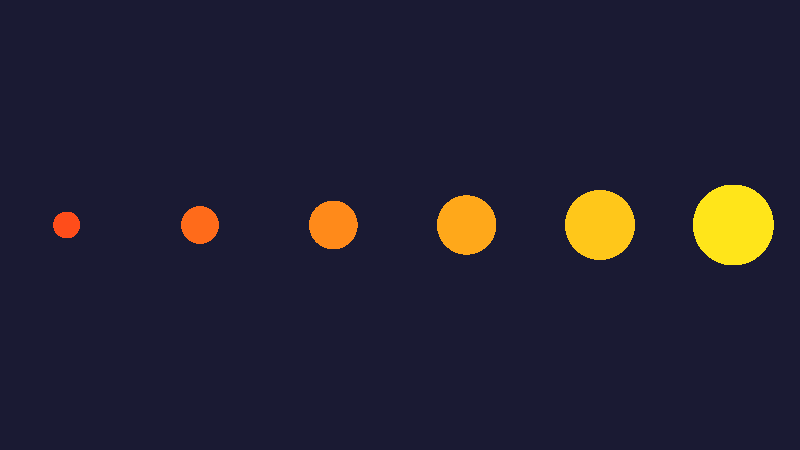
Here the counter i does not just count: it is used in the calculations. On each lap, i is something different, and that is why each circle comes out different:
Lap (i) | Position centerX | Radius |
|---|---|---|
| 0 | 0.5 * aspect / 6 | 0.030 |
| 1 | 1.5 * aspect / 6 | 0.042 |
| 2 | 2.5 * aspect / 6 | 0.054 |
| ... | ... | ... |
| 5 | 5.5 * aspect / 6 | 0.090 |
The position spreads the six circles across the width: we cut the width into six equal pieces and put each circle in the middle of its piece (that is why the + 0.5f). The radius grows by 0.012 with each lap, and so does the green of the color.
For seven circles, change the two 6s to 7. To make them bigger, change the 0.03f.
Step 3: skipping laps with continue#
Sometimes you want nothing to happen on some laps. continue means "end this lap here and go to the next one". Add this at the beginning of the loop body, right below the opening brace:
    if (i % 2 == 1)
    {
        continue;
    }
i % 2 == 1 is true when i is odd. On those laps, continue skips the rest of the block. Run the work cycle.

Only the circles from laps 0, 2 and 4 are drawn. The others were skipped.
Step 4: stopping early with break#
break is the other tool: "leave the loop right now". To see it, remove the continue you just added and make the circles overlap (big fixed radius). Replace the whole loop with this one:
for (int i = 0; i < 6; i++)
{
    float centerX = (i + 0.5f) * aspect / 6f;
    float dx = x - centerX;
    float dy = y - 0.5f;
    if (dx * dx + dy * dy < 0.2f * 0.2f)
    {
        color = Make.Vec4(0.2f + 0.15f * i, 0.5f, 1f - 0.15f * i, 1f);
        break;
    }
}
Compare this result with the same code without the break line (try it yourself: delete it and run again).
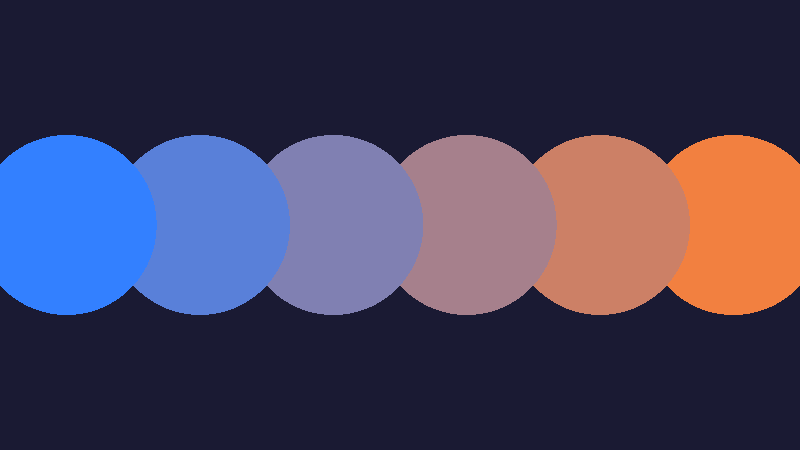
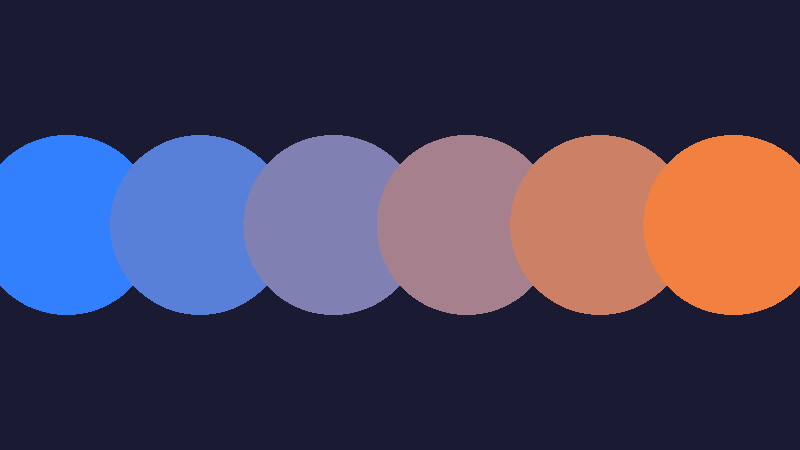
Without break, each lap paints over the previous one, so the last circle wins (the one on the right). With break, as soon as a circle hits, the loop stops, and the first one wins (the one on the left). It is the same idea as the face: the order decides who ends up on top.
Step 5: a list of data, the array#
Until now, what changed on each lap came from a formula with i. But sometimes the data does not follow any formula: it is simply a list. For example, the heights of the bars in a chart.
That is what the array is for: a row of numbered values. It is created like this:
float[] heights = new float[5];
heights[0] = 0.3f;
heights[1] = 0.8f;
heights[2] = 0.5f;
heights[3] = 0.9f;
heights[4] = 0.6f;
new float[5]creates a list with five slots.heights[2]is slot number2. Counting starts at0: the slots are0, 1, 2, 3, 4.
Now, a bar chart. Replace the entire Fragment with this:
float[] heights = new float[5];
heights[0] = 0.3f;
heights[1] = 0.8f;
heights[2] = 0.5f;
heights[3] = 0.9f;
heights[4] = 0.6f;

vec4 color = Make.Vec4(0.1f, 0.1f, 0.2f, 1f);
for (int i = 0; i < 5; i++)
{
    float left = i * 0.2f + 0.03f;
    float right = left + 0.14f;
    if (pixel.Uv.X > left && pixel.Uv.X < right && pixel.Uv.Y > 1f - heights[i])
    {
        color = Make.Vec4(0.2f + 0.15f * i, 0.6f, 0.9f - 0.15f * i, 1f);
    }
}
return color;
Run the work cycle.

Each lap draws one bar: its left and right edges come from i, and its height comes from the list heights[i]. Notice the height condition: Uv.Y > 1f - heights[i]. Remember that Y grows downward, so "being below the line" means having a greater Y.
Change the numbers in the list and you will see the bars go up and down. That is the power of combining a loop with an array: adding one more bar is adding a slot and changing the 5 to a 6.
Another loop: while#
There is another way to repeat, the while, which continues as long as a condition is true:
int pasos = 0;
while (pasos < 100)
{
    pasos++;
}
It does the same as a for, with the difference that you take care of the counter. You will use it when you do not know before starting how many laps to take, though always with a limit. The Mandelbrot, later on, is an example.
Careful: loops cost#
There is a calculation worth doing. If your window has 360,000 pixels and your loop goes around 100 times, the GPU does 36 million laps per image. It is a lot for a person, but a GPU handles it well. What it cannot handle is a loop without an end.
A practical rule: start with few laps, check that it works, and raise the number only if needed.
All together#
This is the complete bar chart file:
using YotsubaShader.GlslSyntax;
using YotsubaShader.GlslSyntax.Types;
using YotsubaShader.Language;

namespace MyShaders;

public class Loops
{
    [ShaderStage(Stage.Vertex)]
    public Pixel Vertex(GodotVertex corner)
    {
        Pixel pixel;
        pixel.Position = Make.Vec4(corner.VERTEX.X, corner.VERTEX.Y, 0f, 1f);
        pixel.Uv = corner.UV;
        return pixel;
    }

    [ShaderStage(Stage.Fragment)]
    [return: location(0)]
    public vec4 Fragment(PixelIn pixel)
    {
        float[] heights = new float[5];
        heights[0] = 0.3f;
        heights[1] = 0.8f;
        heights[2] = 0.5f;
        heights[3] = 0.9f;
        heights[4] = 0.6f;

        vec4 color = Make.Vec4(0.1f, 0.1f, 0.2f, 1f);
        for (int i = 0; i < 5; i++)
        {
            float left = i * 0.2f + 0.03f;
            float right = left + 0.14f;
            if (pixel.Uv.X > left && pixel.Uv.X < right && pixel.Uv.Y > 1f - heights[i])
            {
                color = Make.Vec4(0.2f + 0.15f * i, 0.6f, 0.9f - 0.15f * i, 1f);
            }
        }
        return color;
    }
}using YotsubaShader.HlslSyntax;
using YotsubaShader.GlslSyntax.Types;
using YotsubaShader.Language;
namespace MyShaders;
public class Loops
{
[ShaderStage(Stage.Vertex)]
public Pixel Vertex(GodotVertex corner)
{
Pixel pixel;
pixel.Position = Make.Vec4(corner.VERTEX.X, corner.VERTEX.Y, 0f, 1f);
pixel.Uv = corner.UV;
return pixel;
}
[ShaderStage(Stage.Fragment)]
[return: SV_Target]
public vec4 Fragment(PixelIn pixel)
{
float[] heights = new float[5];
heights[0] = 0.3f;
heights[1] = 0.8f;
heights[2] = 0.5f;
heights[3] = 0.9f;
heights[4] = 0.6f;
vec4 color = Make.Vec4(0.1f, 0.1f, 0.2f, 1f);
for (int i = 0; i < 5; i++)
{
float left = i * 0.2f + 0.03f;
float right = left + 0.14f;
if (pixel.Uv.X > left && pixel.Uv.X < right && pixel.Uv.Y > 1f - heights[i])
{
color = Make.Vec4(0.2f + 0.15f * i, 0.6f, 0.9f - 0.15f * i, 1f);
}
}
return color;
}
}using YotsubaShader.MslSyntax;
using YotsubaShader.GlslSyntax.Types;
using YotsubaShader.Language;
namespace MyShaders;
public class Loops
{
[ShaderStage(Stage.Vertex)]
public Pixel Vertex(GodotVertex corner)
{
Pixel pixel;
pixel.Position = Make.Vec4(corner.VERTEX.X, corner.VERTEX.Y, 0f, 1f);
pixel.Uv = corner.UV;
return pixel;
}
[ShaderStage(Stage.Fragment)]
[return: color(0)]
public vec4 Fragment(PixelIn pixel)
{
float[] heights = new float[5];
heights[0] = 0.3f;
heights[1] = 0.8f;
heights[2] = 0.5f;
heights[3] = 0.9f;
heights[4] = 0.6f;
vec4 color = Make.Vec4(0.1f, 0.1f, 0.2f, 1f);
for (int i = 0; i < 5; i++)
{
float left = i * 0.2f + 0.03f;
float right = left + 0.14f;
if (pixel.Uv.X > left && pixel.Uv.X < right && pixel.Uv.Y > 1f - heights[i])
{
color = Make.Vec4(0.2f + 0.15f * i, 0.6f, 0.9f - 0.15f * i, 1f);
}
}
return color;
}
}using YotsubaShader.WgslSyntax;
using YotsubaShader.GlslSyntax.Types;
using YotsubaShader.Language;
namespace MyShaders;
public class Loops
{
[ShaderStage(Stage.Vertex)]
public Pixel Vertex(GodotVertex corner)
{
Pixel pixel;
pixel.Position = Make.Vec4(corner.VERTEX.X, corner.VERTEX.Y, 0f, 1f);
pixel.Uv = corner.UV;
return pixel;
}
[ShaderStage(Stage.Fragment)]
[return: location(0)]
public vec4 Fragment(PixelIn pixel)
{
float[] heights = new float[5];
heights[0] = 0.3f;
heights[1] = 0.8f;
heights[2] = 0.5f;
heights[3] = 0.9f;
heights[4] = 0.6f;
vec4 color = Make.Vec4(0.1f, 0.1f, 0.2f, 1f);
for (int i = 0; i < 5; i++)
{
float left = i * 0.2f + 0.03f;
float right = left + 0.14f;
if (pixel.Uv.X > left && pixel.Uv.X < right && pixel.Uv.Y > 1f - heights[i])
{
color = Make.Vec4(0.2f + 0.15f * i, 0.6f, 0.9f - 0.15f * i, 1f);
}
}
return color;
}
}using YotsubaShader.SpirvSyntax;
using YotsubaShader.GlslSyntax.Types;
using YotsubaShader.Language;
namespace MyShaders;
public class Loops
{
[ShaderStage(Stage.Vertex)]
public Pixel Vertex(GodotVertex corner)
{
Pixel pixel;
pixel.Position = Make.Vec4(corner.VERTEX.X, corner.VERTEX.Y, 0f, 1f);
pixel.Uv = corner.UV;
return pixel;
}
[ShaderStage(Stage.Fragment)]
[return: Location(0)]
public vec4 Fragment(PixelIn pixel)
{
float[] heights = new float[5];
heights[0] = 0.3f;
heights[1] = 0.8f;
heights[2] = 0.5f;
heights[3] = 0.9f;
heights[4] = 0.6f;
vec4 color = Make.Vec4(0.1f, 0.1f, 0.2f, 1f);
for (int i = 0; i < 5; i++)
{
float left = i * 0.2f + 0.03f;
float right = left + 0.14f;
if (pixel.Uv.X > left && pixel.Uv.X < right && pixel.Uv.Y > 1f - heights[i])
{
color = Make.Vec4(0.2f + 0.15f * i, 0.6f, 0.9f - 0.15f * i, 1f);
}
}
return color;
}
}What you learned#
for (int i = 0; i < n; i++)repeats a blockntimes, withibeing0, 1, ..., n - 1.- The counter
ican be used in the calculations, and that makes each lap draw something different. continuejumps to the next lap.breakleaves the loop.- An array is a fixed-size list of data, numbered from
0. - Dividing two integers discards the decimals. If you need decimals, add an
f. - A loop must always have a limit. Each pixel runs it in full.
Next: Time.