
Shader 4: a moving plasma
How to send data to the shader from your program, using time to animate.
The three previous shaders have something in common: they always draw the same image. That makes sense. The only thing each pixel knows is its Uv, and that never changes.
For something to move, the shader needs a piece of data that changes over time. And the GPU does not have that data: your program does. In this chapter you learn to send it, and with that you make this effect, which is a classic from the 90s:
| Second 0 | Second 1.5 | Second 3 |
|---|---|---|
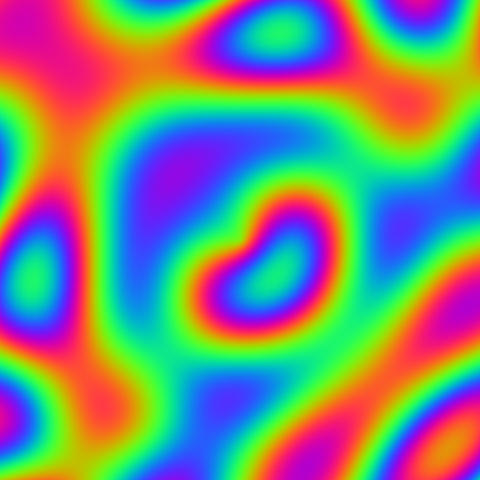 | 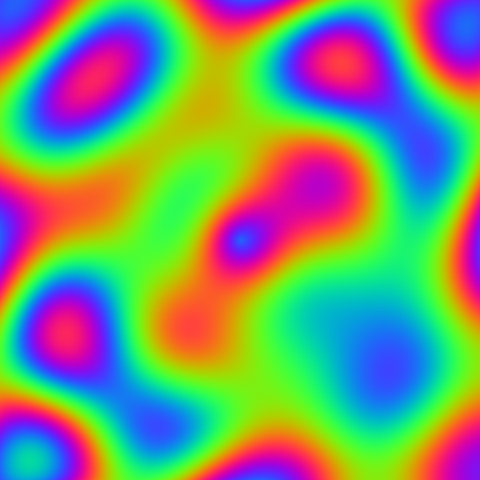 | 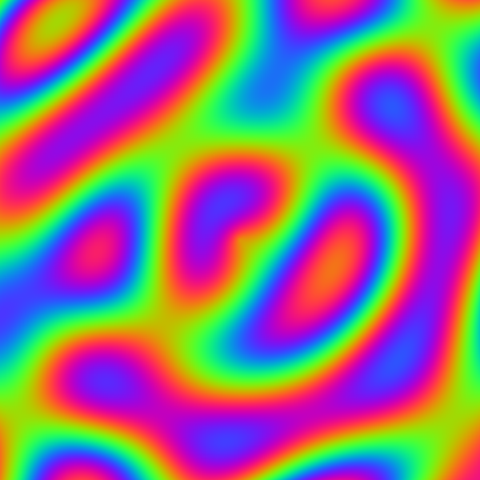 |
They are three moments of the same shader. In motion, the blobs deform and melt into each other without stopping.
Data that comes from outside: the uniform#
A piece of data your program sends to the shader is called a uniform. The name comes from it being "uniform": it has the same value for every pixel. At any one instant, every pixel reads the same time.
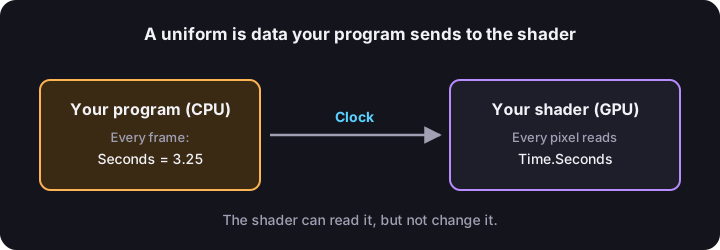
It is declared in two steps.
First, a struct with the data. A normal one, with no attributes:
public struct Clock
{
    public float Seconds;
}
Then, a field in the shader's class, marked with two attributes:
[uniform, layout(0, 0)]
public Clock Time;[cbuffer, register("b0")]
public Clock Time;[constant, buffer(0)]
public Clock Time;[uniform, @group(0), @binding(0)]
public Clock Time;[Uniform, DescriptorSet(0), Binding(0)]
public Clock Time;uniformsays that field is data that comes from your program.layout(0, 0)is its address. It is the same idea as the slots of[location], but for this kind of data the address has two numbers: the group and the slot inside the group. Here it is group 0, slot 0. Your program will have to leave the clock at exactly that address.
These two attributes are in YotsubaShader.GlslSyntax.Resources, so you have to add that using.
And to read it inside the shader, you use it like any field:
float t = Time.Seconds;One thing to keep in mind: the shader can read a uniform, but not change it. Data travels in one direction only, from your program to the GPU.
A wave: the sin function#
sin is the sine. You do not need to remember trigonometry. For what we care about, sin is a function that, whatever number you give it, returns something between -1 and 1, going up and down without stopping, like a wave.
Look at what happens if we paint each pixel according to sin(x * 6f), with black for -1 and white for 1:
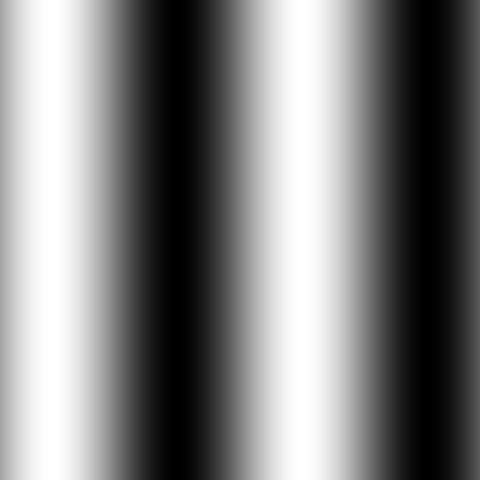
Stripes come out, because as you move right x grows and the sine goes up and down. The 6 says how many stripes fit: with 12 there would be twice as many.
Now comes the important part. If you add the time to it:
sin(x * 6f + t)as t grows, all the stripes slide to one side. With that addition you already have movement.
Four waves together#
Stripes that slide are boring. The plasma comes from adding several waves, each one in a different direction and at a different speed:
float waves = sin(x * 6f + t)
+ sin(y * 6f + t * 1.3f)
+ sin((x + y) * 6f + t * 0.7f)
+ sin(sqrt(x * x + y * y) * 9f - t * 2f);One by one:
| Line | What shape it has | Where it moves |
|---|---|---|
sin(x * 6f + t) | Vertical stripes. | Sideways. |
sin(y * 6f + t * 1.3f) | Horizontal stripes. | Up and down, a bit faster. |
sin((x + y) * 6f + t * 0.7f) | Diagonal stripes. | Diagonally, slower. |
sin(sqrt(x * x + y * y) * 9f - t * 2f) | Circles, like the ripples from a stone in water. You will recognize the distance to the center from the previous chapter. | Outward. |
When you add them, where several crests meet the value is high, and where several troughs meet it is low. Since each one goes at its own pace, the drawing never repeats exactly:

From a number to a rainbow#
waves is a single number. To turn it into color we use the same sin, three times, once for each component of the color:
public static vec4 Rainbow(float value)
{
float red = 0.5f + 0.5f * sin(value * 1.5f);
float green = 0.5f + 0.5f * sin(value * 1.5f + 2.1f);
float blue = 0.5f + 0.5f * sin(value * 1.5f + 4.2f);
return Make.Vec4(red, green, blue, 1f);
}Two details:
0.5f + 0.5f * sin(...)turns the result of the sine, which goes from-1to1, into something that goes from0to1, which is what a color needs.- The
+ 2.1fand+ 4.2fmake green and blue run out of step with red. When red is at the top, the other two are at a different point of their wave. That is why all the colors of the rainbow come out instead of grays.
The complete shader#
using YotsubaShader.GlslSyntax;
using YotsubaShader.GlslSyntax.Resources;
using YotsubaShader.GlslSyntax.Types;
using YotsubaShader.Language;
using static YotsubaShader.GlslSyntax.Methods.Math;
namespace MyShaders;
public struct Clock
{
public float Seconds;
}
public class Plasma
{
[uniform, layout(0, 0)]
public Clock Time;
[ShaderStage(Stage.Vertex)]
public Pixel Vertex(GodotVertex corner)
{
Pixel pixel;
pixel.Position = Make.Vec4(corner.VERTEX.X, corner.VERTEX.Y, 0f, 1f);
pixel.Uv = corner.UV;
return pixel;
}
[ShaderStage(Stage.Fragment)]
[return: location(0)]
public vec4 Fragment(PixelIn pixel)
{
float x = pixel.Uv.X * 2f - 1f;
float y = pixel.Uv.Y * 2f - 1f;
float t = Time.Seconds;
float waves = sin(x * 6f + t)
+ sin(y * 6f + t * 1.3f)
+ sin((x + y) * 6f + t * 0.7f)
+ sin(sqrt(x * x + y * y) * 9f - t * 2f);
return Rainbow(waves);
}
public static vec4 Rainbow(float value)
{
float red = 0.5f + 0.5f * sin(value * 1.5f);
float green = 0.5f + 0.5f * sin(value * 1.5f + 2.1f);
float blue = 0.5f + 0.5f * sin(value * 1.5f + 4.2f);
return Make.Vec4(red, green, blue, 1f);
}
}using YotsubaShader.HlslSyntax;
using YotsubaShader.HlslSyntax.Resources;
using YotsubaShader.GlslSyntax.Types;
using YotsubaShader.Language;
using static YotsubaShader.GlslSyntax.Methods.Math;
namespace MyShaders;
public struct Clock
{
public float Seconds;
}
public class Plasma
{
[cbuffer, register("b0")]
public Clock Time;
[ShaderStage(Stage.Vertex)]
public Pixel Vertex(GodotVertex corner)
{
Pixel pixel;
pixel.Position = Make.Vec4(corner.VERTEX.X, corner.VERTEX.Y, 0f, 1f);
pixel.Uv = corner.UV;
return pixel;
}
[ShaderStage(Stage.Fragment)]
[return: SV_Target]
public vec4 Fragment(PixelIn pixel)
{
float x = pixel.Uv.X * 2f - 1f;
float y = pixel.Uv.Y * 2f - 1f;
float t = Time.Seconds;
float waves = sin(x * 6f + t)
+ sin(y * 6f + t * 1.3f)
+ sin((x + y) * 6f + t * 0.7f)
+ sin(sqrt(x * x + y * y) * 9f - t * 2f);
return Rainbow(waves);
}
public static vec4 Rainbow(float value)
{
float red = 0.5f + 0.5f * sin(value * 1.5f);
float green = 0.5f + 0.5f * sin(value * 1.5f + 2.1f);
float blue = 0.5f + 0.5f * sin(value * 1.5f + 4.2f);
return Make.Vec4(red, green, blue, 1f);
}
}using YotsubaShader.MslSyntax;
using YotsubaShader.MslSyntax.Resources;
using YotsubaShader.GlslSyntax.Types;
using YotsubaShader.Language;
using static YotsubaShader.GlslSyntax.Methods.Math;
namespace MyShaders;
public struct Clock
{
public float Seconds;
}
public class Plasma
{
[constant, buffer(0)]
public Clock Time;
[ShaderStage(Stage.Vertex)]
public Pixel Vertex(GodotVertex corner)
{
Pixel pixel;
pixel.Position = Make.Vec4(corner.VERTEX.X, corner.VERTEX.Y, 0f, 1f);
pixel.Uv = corner.UV;
return pixel;
}
[ShaderStage(Stage.Fragment)]
[return: color(0)]
public vec4 Fragment(PixelIn pixel)
{
float x = pixel.Uv.X * 2f - 1f;
float y = pixel.Uv.Y * 2f - 1f;
float t = Time.Seconds;
float waves = sin(x * 6f + t)
+ sin(y * 6f + t * 1.3f)
+ sin((x + y) * 6f + t * 0.7f)
+ sin(sqrt(x * x + y * y) * 9f - t * 2f);
return Rainbow(waves);
}
public static vec4 Rainbow(float value)
{
float red = 0.5f + 0.5f * sin(value * 1.5f);
float green = 0.5f + 0.5f * sin(value * 1.5f + 2.1f);
float blue = 0.5f + 0.5f * sin(value * 1.5f + 4.2f);
return Make.Vec4(red, green, blue, 1f);
}
}using YotsubaShader.WgslSyntax;
using YotsubaShader.WgslSyntax.Resources;
using YotsubaShader.GlslSyntax.Types;
using YotsubaShader.Language;
using static YotsubaShader.GlslSyntax.Methods.Math;
namespace MyShaders;
public struct Clock
{
public float Seconds;
}
public class Plasma
{
[uniform, @group(0), @binding(0)]
public Clock Time;
[ShaderStage(Stage.Vertex)]
public Pixel Vertex(GodotVertex corner)
{
Pixel pixel;
pixel.Position = Make.Vec4(corner.VERTEX.X, corner.VERTEX.Y, 0f, 1f);
pixel.Uv = corner.UV;
return pixel;
}
[ShaderStage(Stage.Fragment)]
[return: location(0)]
public vec4 Fragment(PixelIn pixel)
{
float x = pixel.Uv.X * 2f - 1f;
float y = pixel.Uv.Y * 2f - 1f;
float t = Time.Seconds;
float waves = sin(x * 6f + t)
+ sin(y * 6f + t * 1.3f)
+ sin((x + y) * 6f + t * 0.7f)
+ sin(sqrt(x * x + y * y) * 9f - t * 2f);
return Rainbow(waves);
}
public static vec4 Rainbow(float value)
{
float red = 0.5f + 0.5f * sin(value * 1.5f);
float green = 0.5f + 0.5f * sin(value * 1.5f + 2.1f);
float blue = 0.5f + 0.5f * sin(value * 1.5f + 4.2f);
return Make.Vec4(red, green, blue, 1f);
}
}using YotsubaShader.SpirvSyntax;
using YotsubaShader.SpirvSyntax.Resources;
using YotsubaShader.GlslSyntax.Types;
using YotsubaShader.Language;
using static YotsubaShader.GlslSyntax.Methods.Math;
namespace MyShaders;
public struct Clock
{
public float Seconds;
}
public class Plasma
{
[Uniform, DescriptorSet(0), Binding(0)]
public Clock Time;
[ShaderStage(Stage.Vertex)]
public Pixel Vertex(GodotVertex corner)
{
Pixel pixel;
pixel.Position = Make.Vec4(corner.VERTEX.X, corner.VERTEX.Y, 0f, 1f);
pixel.Uv = corner.UV;
return pixel;
}
[ShaderStage(Stage.Fragment)]
[return: Location(0)]
public vec4 Fragment(PixelIn pixel)
{
float x = pixel.Uv.X * 2f - 1f;
float y = pixel.Uv.Y * 2f - 1f;
float t = Time.Seconds;
float waves = sin(x * 6f + t)
           + sin(y * 6f + t * 1.3f)
           + sin((x + y) * 6f + t * 0.7f)
           + sin(sqrt(x * x + y * y) * 9f - t * 2f);
return Rainbow(waves);
}
public static vec4 Rainbow(float value)
{
    float red = 0.5f + 0.5f * sin(value * 1.5f);
    float green = 0.5f + 0.5f * sin(value * 1.5f + 2.1f);
    float blue = 0.5f + 0.5f * sin(value * 1.5f + 4.2f);
    return Make.Vec4(red, green, blue, 1f);
}
}What happens to the uniform when compiling#
When add processes a shader with a uniform, your struct and its address show up in the output. In GLSL they look like this:
layout(set = 0, binding = 0, std140) uniform Clock
{
    float Seconds;
} Time;
There are your Clock, your Seconds, your Time field and the two numbers from layout(0, 0): set = 0 is the group and binding = 0 is the slot.
How your program sends it the time#
This part happens outside the shader, in your program, and it is what makes the image move. On every frame you draw:
- You check how many seconds have passed since the program started.
- You store that number in a
Clock. - You hand that
Clockto the GPU, at group 0, slot 0. - You draw.
Step 3 is different in each engine and each graphics API. But steps 1 and 2 are normal C#, and they have an advantage you only get from writing the shader in C#: the struct Clock the shader uses is the same one your program uses. There are not two definitions to keep in sync by hand.
You can try it right now in TryIt. This program creates a Clock and turns it into the bytes that have to be handed to the GPU:
using System.Runtime.InteropServices;
using MyShaders;

var clock = new Clock { Seconds = 3.25f };

byte[] bytes = MemoryMarshal.AsBytes(MemoryMarshal.CreateReadOnlySpan(ref clock, 1)).ToArray();

Console.WriteLine($"The uniform takes {bytes.Length} bytes.");
The output is The uniform takes 4 bytes., which is what a float takes.
In Godot, the clock is already connected#
The generated Godot shader declares your uniform as a plain value named after the field and the member:
uniform float Time_Seconds;The viewer script from the viewer chapter already handles it: every frame it looks for uniforms that end in _Seconds and writes the seconds since the game started. That is why Plasma moves just by typing Plasma in Shader Name and pressing Play; you do not write any extra code.
If you rename the field to something else (Clock.Seconds in a field called Wall, for example), the uniform becomes Wall_Seconds and the viewer still finds it, because it only looks at the ending.
Play with it#
- Change the
1.5finRainbowto0.5f. The colors change more slowly from one blob to the next, and you get bigger blobs of a single color. - Multiply the time:
float t = Time.Seconds * 3f;. Everything goes three times faster. - Add a second piece of data to the
Clock, for examplepublic float Speed;, and use it in that multiplication. Now your program controls the speed without touching the shader.
What you learned#
- A uniform is data your program sends to the shader. It has the same value for every pixel.
- It is declared with a
structand a field marked with[uniform, layout(group, slot)]. - The shader reads it, but cannot change it.
- The same
structworks in the shader and in your program. sinmakes waves. If you add the time to it, the waves move.
Next: Shader 5: a photo underwater.